IMPORTANT: CONSTRUCTION NOTICE For your safety, no customers will be permitted on our grounds until further notice.
Bills can be paid online through SmartHub by clicking here or in person at any Friendship State Bank Location. You may also call 1-844-980-3042 to pay with a credit card or set up automatic payments, so you know you’re covered every month!
Please call our office at 888-200-8077 for all other inquiries. We are sorry for any inconvenience this may cause.
Select Page
Android Email
SEI Communications, Inc – A Total Internet and Communications Company
How to setup Android Email for SEI Email access
Under Apps, open Email application.
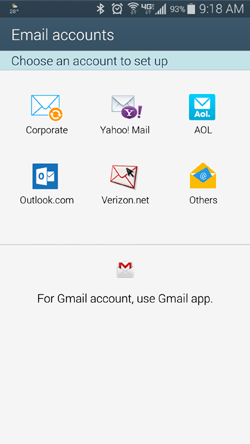
1) Email accounts
Touch "Others".
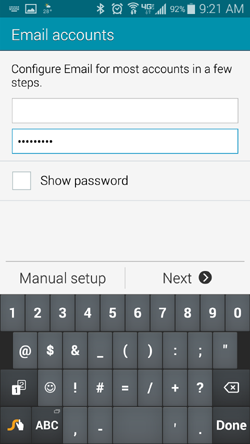
2) Email accounts
Enter in your full SEIData email address and password.
Touch "Manual Setup".
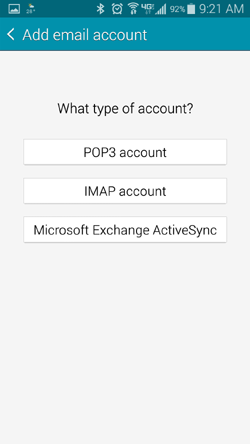
3) Add email account
Touch "IMAP account"
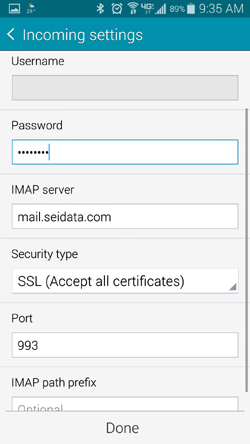
4) Incoming settings
Enter in username and password
Change IMAP server to mail.seidata.com
Change Security type to SSL (Accept all certificates)
Change Port to 993 if not set.
Touch "Done".
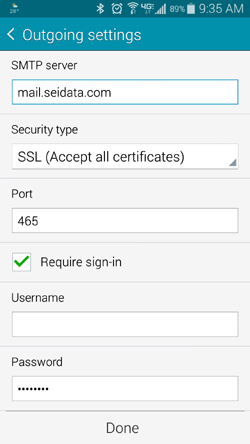
5) Outgoing settings
Change SMTP server to mail.seidata.com
Change Security type to SSL (Accept all certificates)
Change Port to 465 if not set already
Check Require sign-in
Enter in username and password
Touch "Done"
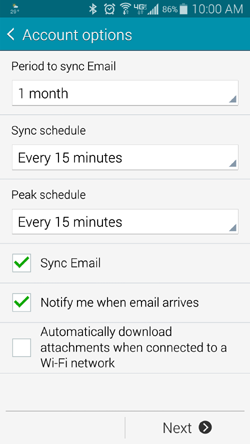
6) Account options
Set Account options to desired settings.
Touch "Next"
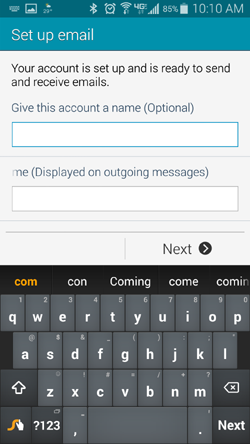
7) Set up email
Enter in Account Name and the name you want displayed on outgoing messages.
Touch "Next"..
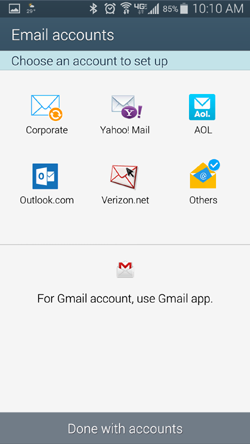
8) Email accounts
You will be returned to the initial Email accounts screen.
Touch "Done with accounts" at bottom of screen.
Internet Tech Support
Available 24×7
800-925-6746 | 812-574-8800 | 812-667-8800 812-744-8800 | 812-839-8800 | 812-873-8800
Cellular Technical Support
Monday through Friday ~ 8:00am to 4:30pm
888-200-8077